This is NOT the official AMTEC application website.
AMTEC CORE is currently in its pilot version and is intended solely for prototyping, testing, and evaluation purposes. It is not yet deployed for public use.
Create your AMTEC CORE Account or Log in to monitor the status of your application.
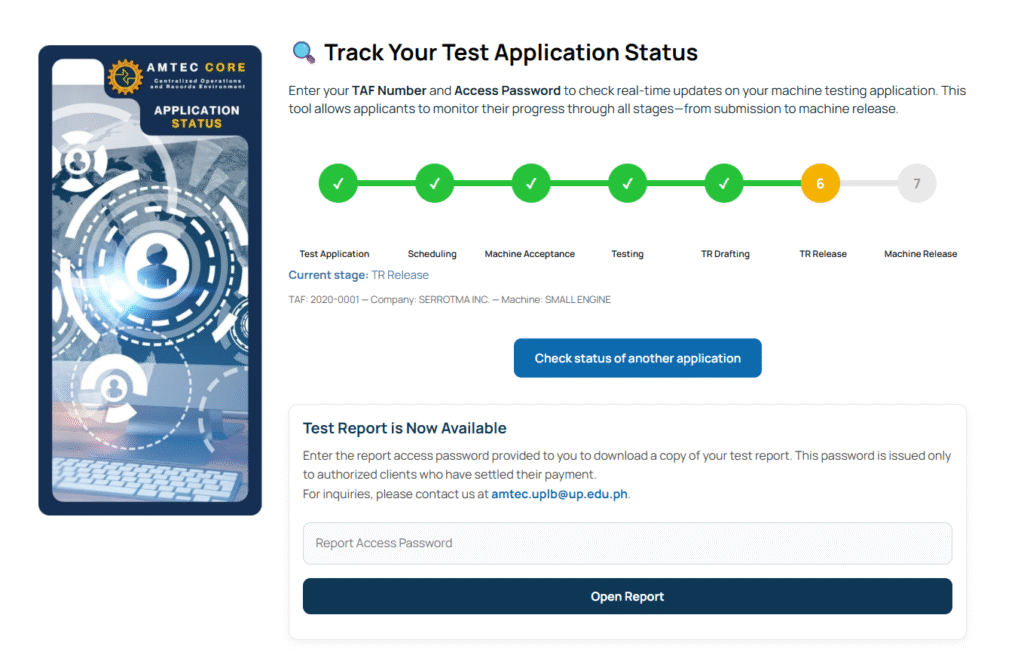
Track your testing application in real time, receive updates, upload additional documents when required, and download your Test Report once available.
Create Account or Log In to access all tracking features.
ℹ️ How to apply for testing?
Welcome to the AMTEC CORE Testing Application Guide. This page will walk you through the steps required to submit your machinery for testing and ensure a smooth, complete, and hassle-free application.
Prepare All Required Documents
Before filling out the application form, prepare digital copies (PDF, JPEG, PNG) of the following:
Required Documents
• Valid ID of the applicant or authorized representative
• Technical specifications of the machine
• Brochure or user manual (if available)
• Photos of the machine
• Other supporting documents depending on machine type
Tips
• Make sure all files are clear and readable
• Combine multipage documents into one PDF (recommended)
• Incomplete requirements may cause delays
Check the Testing Requirements
Different machines have different requirements. Please refer to AMTEC’s Testing Checklist and Reminders for:
• List of other necessary AMTEC Forms to be submitted
• List of documents for technical specifications
• Preparation and operation of the machine
• Running-in of the machine
• Test Plot
• Other necessities and machine settings
• Requirements (Fabrication Requirements, Standard Tools, Workmanship and Finish, Performance Requirements)
• Suspension and Termination of Test
• Other assistance during test
• Testing Fee and instructions for payments
• Other reminders
Fill Out the Online Testing Application Form
Visit the Submit Application for Testing page and complete the required fields. You will be asked to provide applicant information, company details (if applicable), machinery details, and to upload required documents.
Submit Your Application
After filling in all information, review your entires carefully and make sure all required documents are attached. Click Submit.
Wait for AMTEC’s Initial Review
Your application will undergo a preliminary check. AMTEC will verify completeness of documents, eligibility for testing, and accuracy of provided information. If something is missing, you will be contacted through the email you provided.
Coordinate with AMTEC for Scheduling
Once your application is approved, AMTEC will notify you regarding available testing dates, schedule confirmation, additional instructions for bringing or delivering the machinery, safety reminders, and any preparation needed prior to testing.
Bring or Deliver the Machinery to AMTEC*
On the confirmed date:
• Ensure machinery is in proper working condition
• Bring all necessary accessories or attachments
• Follow AMTEC’s receiving and safety protocols
Testing and Evaluation Process
Your machinery will go through performance testing, safety checks, technical inspection, and additional evaluations required by standards. Processing time varies depending on machinery type and testing queue.
Release of Test Report
After testing, the Test Report will undergo internal review. You will be notified once the report is ready. If you have an AMTEC CORE account, you can log in to monitor the progress of your application and download your test report once available.
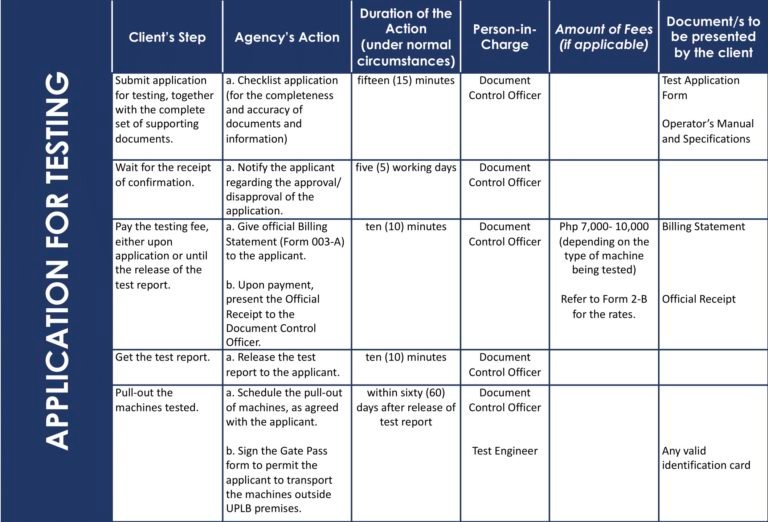
| Client’s Step | Agency’s Action | Duration of the Action (under normal circumstances) | Person-in-Charge | Amount of Fees (if applicable) | Document/s to be presented by the client |
|---|---|---|---|---|---|
| Submit application for testing, together with the complete set of supporting documents. | Checklist application (for the completeness and accuracy of documents and information) | fifteen (15) minutes | Document Control Officer | Test Application Form Operator’s Manual and Specifications | |
| Wait for the receipt of confirmation. | a. Notify the applicant regarding the approval/ disapproval of the application. | five (5) working days | Document Control Officer | ||
| Pay the testing fee, either upon application or until the release of the test report. Upon payment, present the Official Receipt to the Document Control Officer. | Give official Billing Statement (Form 003-A) to the applicant. | ten (10) minutes | Document Control Officer | Php 7,000- 10,000 (depending on the type of machine being tested) | Billing Statement Official Receipt |
| Get the test report. | Release the test report to the applicant. | ten (10) minutes | Document Control Officer | ||
| Pull-out the machines tested. | Schedule the pull-out of machines, as agreed with the applicant. Sign the Gate Pass form to permit the applicant to transport the machines outside UPLB premises. | within sixty (60) days after release of test report | Document Control Officer Test Engineer | Any valid identification card |